






Homes.com Real Estate & Rent review
 Analysis by GetAllApps
I judge a home-search app less by how exciting it feels on the first day than by whether it still helps once the search turns into a routine. Homes.com is built for people weighing homes, rentals, agents, and schools in one place. My first impression is that it makes a useful starting point for a move, but its lasting value depends on how actively you are searching and how much you want to compare before contacting anyone.
Useful momentum at the start of a search
In the first week, the appeal is straightforward: I can use one app to explore homes for sale and rentals, while also looking into agents and schools. That combination matters when a move is still taking shape. I may not yet know whether buying or renting is the better fit, and being able to browse both keeps the early decision-making from splitting across several tools.
The app is free, and its House & Home focus makes its purpose clear. Homes.com is developed by CoStar Homes.com Android Team, and the Android app has been available since September 10, 2012. Its current version is 18.8.0, with Android 10 as the minimum operating system. These details make it practical to check compatibility before relying on it as part of a moving plan.
A useful way to start is to treat browsing as research rather than a commitment. I would first identify a few areas that seem plausible, then compare the kinds of homes and rentals appearing in each. Only after that would I narrow down the options I might want to pursue. This prevents an attractive individual listing from pulling attention away from the larger question of whether the area, housing type, and budget make sense together.
The school search can add context for people choosing where to live, especially families who are comparing neighborhoods as well as properties. It is best used as one piece of that decision, not as a substitute for checking details that matter personally. A school result can help direct further research, but choosing a home still calls for looking closely at the property, location, commute, and the household’s own priorities.
For a realistic everyday scenario, imagine that I am planning a move but do not yet know whether I should rent near work or buy farther out. I can use Homes.com to explore both paths, note which areas keep turning up as promising, and then look into agents when I am ready to discuss a purchase. That is more useful than opening the app with no question in mind and scrolling indefinitely.
How I would turn browsing into a decision
I would keep a small shortlist and compare candidates against the same needs: location, type of home, space, and any household requirements. This is a simple discipline, but it reduces the chance of confusing a memorable listing with a genuinely suitable one. It also makes later conversations with an agent more focused because I can explain what I have been looking for rather than starting from vague impressions.
Because the app covers several parts of a housing search, it can help with a less obvious trade-off: broad exploration is convenient, but it can blur distinct decisions. Renting and buying involve different timelines and questions. I would avoid judging them by the same quick browsing session; instead, I would use the app to discover possibilities, then assess each route on its own terms.
What keeps it useful after the first week
Its recurring value comes from being a place to return to as plans change. A search can shift when a lease date moves, a commute becomes more important, or a purchase starts to feel realistic. Having homes, rentals, agents, and schools under the same roof gives me a reason to revisit the app without requiring every visit to serve the same purpose.
The scale of its audience offers some reassurance that it is not an obscure listing tool: it has over one million installs, a 4.7 average rating, and around 31,000 ratings. Those figures suggest broad use, but they do not tell me whether a particular neighborhood has the coverage I need or whether an individual listing is current. I would still check important details directly before making a decision.
Compared with the usual approach of searching through separate property, rental, and local-information tools, the advantage here is convenience and continuity. The trade-off is that a single app should not automatically become the final authority on every part of a move. If I need a specialized rental process, detailed local records, or direct confirmation from a property representative, another source may be necessary alongside it.
I also see a practical benefit in using the app at different stages rather than trying to solve everything at once. Early on, I might use it to compare areas and housing types. Later, I might return to review specific options or consider which agent to contact. That change in purpose helps the app remain useful without turning every session into another round of aimless browsing.
A light routine beats constant checking
Home searches can create the feeling that I need to check listings all the time. I would resist that habit unless my timeline is genuinely urgent. A planned review—such as revisiting the shortlist when I have time to compare it properly—makes more sense than repeatedly opening the app for a quick look that produces no decision.
One helpful habit is to record why a property or area made the shortlist, not just that it caught my eye. Maybe the location fits a commute, or the available rental options suit a near-term move. This makes it easier to revisit choices with a clear head and remove candidates that no longer match. The app can support discovery, but the quality of the search still depends on how thoughtfully I evaluate what I find.
Where the convenience can wear thin
The same breadth that makes Homes.com appealing can also become a source of fatigue. Homes, rentals, agents, and schools are related, but they can produce a lot to consider when I have not settled on a clear goal. If I open it without knowing whether I am researching a neighborhood, comparing rentals, or looking toward a purchase, the experience can feel more like a stream of possibilities than a plan.
Another limitation is inherent to property browsing: a listing is only a starting point for investigation. I would not assume that a promising result alone answers questions about availability, suitability, or the realities of living there. Before acting, I would confirm the details that affect my decision with the relevant person or source. This extra step is not a reason to avoid the app; it is part of using any real-estate search responsibly.
Homes.com may also be the wrong fit for someone who wants a narrow tool for one immediate task. If I already know the exact rental process or professional I need, a dedicated service or direct contact may be quicker. Similarly, someone who is not moving and has no interest in browsing properties may not get enough repeated value to justify keeping a home-search app in regular rotation.
Its Everyone content rating makes the app broadly suitable from an age-classification standpoint, but the subject matter is most useful to people involved in choosing a home. I would not mistake broad accessibility for a reason that every household member needs to use it. For many people, one person coordinating the search and sharing the relevant findings is enough.
Maintenance without making the search a chore
Maintaining a useful search does not have to mean constant app upkeep. I would revisit my priorities whenever a major constraint changes, such as timing, location, or whether I am leaning toward renting or buying. If nothing has changed, there is little value in rebuilding the search each day. The app is more helpful when it supports decisions than when it becomes a habit in its own right.
I would also periodically remove options that no longer fit. A shortlist that grows without review becomes its own burden: old possibilities crowd out the ones worth investigating now. Even a quick pass to ask “Would I still consider this?” can make the next session clearer. This is a useful workflow for a broad property app because it turns browsing into an ongoing comparison rather than a collection of attractive but disconnected options.
At the same time, I would not rely on an app alone for the entire move. A property search can help me discover choices and identify questions, while direct conversations and independent checks handle the decisions that carry real consequences. That division of labor is sensible: Homes.com can organize exploration, but I remain responsible for verifying what matters before committing.
My long-term recommendation
Homes.com earns a place on my phone when a move is active or likely enough that I need to compare homes, rentals, agents, and schools over time. Its strongest quality is the way those parts of a housing search can sit together, which is especially useful when the plan is still evolving. It is free, widely used, and focused on a practical subject, but those points do not remove the need for careful judgment.
I would recommend it to someone beginning a move, a renter exploring alternatives, or a buyer who wants a broad view before contacting an agent. I would skip it—or use it only occasionally—if I had no housing decision ahead, wanted a highly specialized service, or found that casual browsing was increasing stress rather than narrowing choices.
After the novelty fades, the app’s value comes down to whether I return with a real question and leave with a clearer next step. Used that way, it can be a steady research companion instead of another feed to check. My advice is simple: start broad, keep a small and reasoned shortlist, and verify consequential details before acting. That approach makes the app’s convenience count while keeping the final decision firmly in your hands.
Pros and cons
Pros
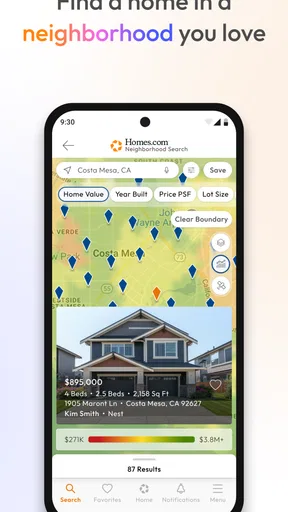
- Map search makes it easy to explore homes by location.
- Saved searches help you keep track of properties that interest you.
- Property photos offer a useful first look before scheduling a tour.
- Listing details can help you compare homes at a glance.
- The app supports searches for homes to buy or rent.
Cons
- Listing details may be incomplete or outdated.
- Some properties may no longer be available when you contact the agent.
- Search results can vary depending on the selected filters.
- A stable internet connection is needed to browse listings.
- Availability and features may differ between Android and iOS.


